Django AI Agentic Services With LangChain
We recently completed the implementation of LangChain-based AI bots in our Django project using a service-oriented architecture. Adopting LangChain allowed us to solve several challenges at once:
We eliminated tight coupling to a specific LLM. We ran the same tasks on different models to see which one performed better, faster, and cheaper.
We deeply integrated the agent with our business logic.
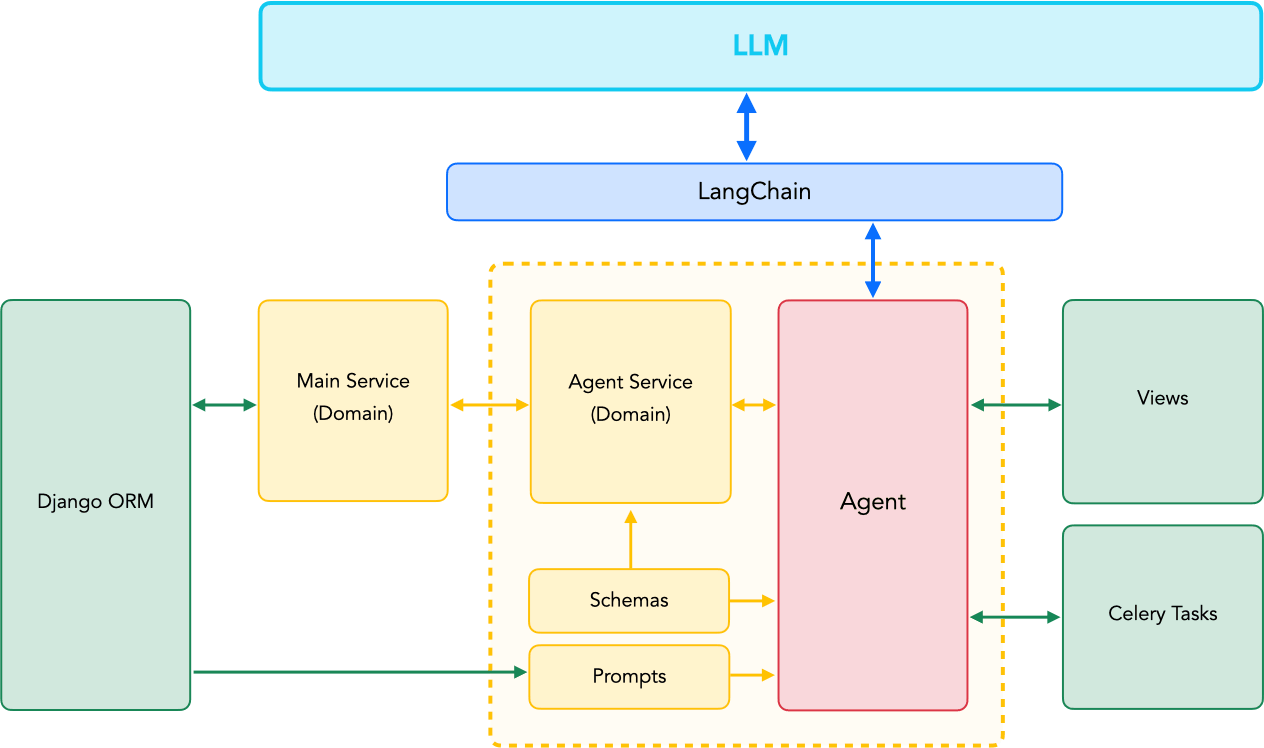
In other words, we built internal services that use other Django components while providing a toolset for the AI agent. With these tools, LLMs can interact with our application: query the database via the ORM, or run Celery tasks.
The primary goal was to add practical assignments to our Python and SQL courses. Each assignment is verified on our own servers, and we wanted to delegate the creation of task conditions and tests to AI agents.
Based on the lesson data, pedagogical principles, and the student's profile, the agents can now prepare and test a set of assignments.
Security
When you give an AI agent access to your database, the first thing you need to think about is security. You don't want a random LLM hallucination to wipe out critical information.
Therefore, we defined several layers of protection:
Personal Account. The AI agent has its own user account in Django. The agent can only manage the database records it has created itself. This is easy to enforce via ORM-level filtering.
Personal Service. The suite of tools available to the AI agent is restricted and designed specifically for it. Even though we might use shared services internally, the agent has direct access only to its own dedicated service.
Tool Restriction. There are two approaches to providing tools to an agent:
- The first is to provide the broadest and most flexible tools with detailed schema descriptions, and then give the LLM a generic task so it chooses the right action. However, even with detailed descriptions, the LLM will occasionally call the wrong functions.
- The second option is to give the agent only the specific set of tools required for a particular task. In this case, you gain more predictability and control. We combine both approaches.
Idempotency and Replay Protection. Tools must handle repeated calls gracefully or block them within a single agent session. Make no mistake: sooner or later, the LLM will try to call your tool repeatedly. In the worst-case scenario, the model will enter a loop and start creating database objects endlessly while burning through your tokens.
Stop Execution / Fail Fast. If something goes wrong, log the error and stop the program execution. Yes, you can ask the LLM to fix the JSON if it fails validation on the first try, but if the JSON contains invalid data for a specific tool, just terminate the code execution. Analyze the logs, adjust the prompts, expand your service (if needed), and then restart the agent from where it left off.
Validation and Documentation. To prevent your service from crashing every time the LLM outputs malformed JSON, you must explicitly pass the expected data format to the model. Highly detailed data schemas and solid documentation eliminate a multitude of problems.
Manual Verification. At this stage, we cannot completely trust the LLM, so manual verification and adjustments (human-in-the-loop) remain in place for all critical phases. Furthermore, this allows us to refine the prompts, improving interaction with the agent on each iteration.
AI Service Architecture
AI services are the home for your agents' business logic:
- classes and functions for interacting with your system;
- prompts;
- schemas;
- the agents themselves.
We usually place the services in a ai_services package inside the Django app (similar to the Django-Styleguide).
The basic structure looks like this:
app/
    ai_services/
        __init__.py

        # Core structure
        prompts.py  # classes and functions for prompt generation
        schemas.py  # data schemas for Pydantic validation
        agents.py   # agents

        # Business logic services
        gen_programming_tasks_service.py  # Python task generation service
        gen_sql_tasks_service.py          # SQL task generation service
The service itself is simply a class containing a set of methods and tools. We tested three interaction models:
The AI agent requests text and immediately inserts it into the database.
The AI agent requests JSON, then invokes a validation tool, and returns the parsed list or dictionary to the program. Afterwards, we run a separate process to save the data to the database.
Everything exactly like point 2, but after validation, the agent itself places the information into the database using a tool. This is the approach we ultimately chose.
Agents and Services
We deployed several agents:
- An agent that creates task conditions. In a single pass, it prepares multiple assignments by requesting JSON from the selected LLM.
- An agent that creates the testing dataset.
- An agent that writes the solution code.
Let's focus on the first agent, which creates the task conditions.
Below, we will use a Module model from our project, which represents a lesson in our application.
The Task model represents a lesson assignment: it has a title, text, a set of unit tests for verification, and the solution code.
All agents and services revolve around these models.
Schemas
app/ai_services/schemas.py
As mentioned earlier, the quality of the schema and documentation dictates how accurate the data provided by the LLM will be. Thus, we start by defining the schemas.
When working with nested schemas, we go top-down: first detailing the individual elements, and finally defining the overarching schema containing the lists and dictionaries. We typically append the Schema suffix (e.g., TasksSchema) to the final schema class to make navigating the codebase easier.
from pydantic import BaseModel, Field

# Schemas for task condition validation
class TaskItem(BaseModel):
    name: str = Field(description="Task title")
    text: str = Field(description="Task description in HTML format")
    code: str = Field(description="Initial code for the task (if required)")

class TasksSchema(BaseModel):
    tasks: list[TaskItem]
Prompts
app/ai_services/prompts.py
Following the schema, we write the prompts — making them as detailed and granular as possible. Absolutely everything hinges on the quality of the prompt. The combined volume of prompts for our agents far exceeds the volume of the code that serves them.
from courses.models import Module


class ProgrammingTasksPrompt:
    """
    Prompt generator for forming a list of programming tasks.
    It operates based on an already published module containing a lesson.
    """

    def __init__(self, module: Module):
        self.module = module

    def get_prompt(self, tasks_count: int = 5):
        prompt = f"Prompt text"
        prompt += f"Prompt continuation"
        return prompt
Tools and Services
app/ai_services/gen_programming_tasks_services.py
Once prompts and schemas are ready, we can establish the AI service and its tools. We've noted all crucial points in the code comments:
from langchain.tools import tool

from users.models import User
from courses.models import Module
from practice.models import Task
from practice.ai_services.schemas import TaskItem, TasksSchema


class AIGenProgrammingTaskService:
    """
    Service for generating programming tasks.
    """

    def __init__(self, module: Module):
        self.module = module

    @property
    def tools(self):
        """
        The set of tools we expose to the LLM.
        """
        return [
            self.add_tasks_tool(),
            self.add_task_tests_tool(),
            self.add_task_solution_tool(),
        ]

    def _create_task(self, name: str, text: str, code: str = ""):
        """
        Internal method for adding tasks to the database.
        """

        Task.objects.create(
            # Business fields
            name=name,
            text=text,
            code=code,
            active=False,

            # AI fields
            ai_status="draft",  # Explicitly set the initial state
            ai_user=User.get_ai_user()  # Set the owner to outline the agent's scope
        )

    def add_tasks_tool(self):
        """
        Returns the tool. The method name ends in _tool for convenience.
        """

        # It is mandatory to pass the data schema in args_schema.
        # return_direct=True explicitly specifies that no further LLM queries should be made after tool execution.
        # Without return_direct, there will always be at least two queries.

        @tool("add_tasks", args_schema=TasksSchema, description="Adds programming tasks", return_direct=True)
        def add_tasks(tasks: list[TaskItem]):
            for task in tasks:
                self._create_task(name=task.name, text=task.text, code=task.code)

        return add_tasks
Agents
app/ai_services/agents.py
Extracting agents into separate classes isn't strictly required, but it significantly simplifies the broader business logic.
For instance, you can encapsulate your service inside an agent and then rely on just a single object in your views or Celery tasks.
How you organize the agent itself depends heavily on your specific business requirements. Here is one approach:
from pydantic import BaseModel
from typing import Type, Union

# LangChain
from langchain.agents import create_agent
from langchain_openai import ChatOpenAI
from langchain_google_genai import ChatGoogleGenerativeAI
from langchain_anthropic import ChatAnthropic
from langchain.agents.structured_output import ProviderStrategy

# Service classes
from practice.ai_services.gen_programming_tasks_services import AIGenProgrammingTaskService
from practice.ai_services.schemas import TasksSchema
from practice.ai_services.prompts import ProgrammingTasksPrompt

# Django models
from courses.models import Module


SupportedChats = Union[ChatOpenAI, ChatGoogleGenerativeAI, ChatAnthropic]


class AIAgent:
    """
    Abstract base class for building AI agents.
    """
    def __init__(self, model: str, chat: Type[SupportedChats], tools: list, response_schema: Type[BaseModel]):
        self.model = chat(model=model, temperature=0.5, timeout=60, max_retries=2)
        # Create a LangChain agent that will pipe requests to LLM service APIs.
        self.agent = create_agent(
            model=self.model,
            tools=tools,
            response_format=ProviderStrategy(response_schema)
        )


class GenProgrammingTaskAgent(AIAgent):
    """
    Agent responsible for generating programming task conditions.
    """

    def __init__(self, model: str, chat: Type[SupportedChats], module: Module, tasks_count: int):
        self.service = AIGenProgrammingTaskService(module=module)
        self.prompt = ProgrammingTasksPrompt(module=module)
        self.tasks_count = tasks_count
        super().__init__(model=model, chat=chat, tools=self.service.tools, response_schema=TasksSchema)

    def run(self):
        # Direct API invocation to the LLM, passing the configured prompt.
        self.agent.invoke({
            "messages": [{
                "role": "user",
                "content": self.prompt.get_prompt(tasks_count=self.tasks_count)
            }]
        })
Using the Agent
Form
We had a very straightforward goal: to generate a set of tasks using different models.
We can pick the number of tasks and the LLMs via a form:
from django import forms

# We interact with the LLMs through a proxy service, so the model names used there
# might not inherently match the real ones.
LLM_CHOICES = (
    ("OpenAI", (
        ("gpt-5.4-mini", "ChatGPT 5.4 Mini"),
        ("gpt-5.4", "ChatGPT 5.4"),
    )),
    ("Google", (
        ("gemini-3-flash-preview", "Gemini 3 Flash"),
        ("gemini-3.1-pro-preview", "Gemini 3.1 Pro"),
    )),
    ("Anthropic", (
        ("claude-sonnet-4-6", "Claude Sonnet"),
        ("claude-opus-4-7", "Claude Opus"),
    )),
)


class GenTaskForm(forms.Form):
    tasks_count = forms.IntegerField(
        label="Number of tasks",
        initial=5,
        min_value=1,
    )

    llm_models = forms.MultipleChoiceField(
        label="LLM models",
        choices=LLM_CHOICES,
        widget=forms.CheckboxSelectMultiple,
        initial=["gpt-5.4-mini"],
    )
View
Now we can easily instantiate the agents and wire them to our service layer:
# Django
from django.http import HttpResponse
from django.template.loader import get_template

# LangChain chat-models
from langchain_anthropic import ChatAnthropic
from langchain_google_genai import ChatGoogleGenerativeAI
from langchain_openai import ChatOpenAI

# Form, agent, and module
from ai.forms import GenTaskForm
from practice.ai_services.agents import GenProgrammingTaskAgent
from courses.models import Module


def generate_tasks(request, module_id):
    # Fetch the module
    module = Module.objects.get(id=module_id)

    # Process the form
    gen_task_form = GenTaskForm(request.POST or None)
    if request.method == "POST" and gen_task_form.is_valid():
        llm_models = gen_task_form.cleaned_data["llm_models"]

        # Iterate through selected models
        for model in llm_models:
            chat = {
                "gpt": ChatOpenAI,
                "claude": ChatAnthropic,
                "gemini": ChatGoogleGenerativeAI,
            }.get(model[:model.find("-")], ChatOpenAI)

            # Initialize and run the agent
            GenProgrammingTaskAgent(
                model=model,
                chat=chat,
                module=module,
                tasks_count=gen_task_form.cleaned_data["tasks_count"]
            ).run()

    template = get_template("ai/generate_tasks.html")
    context = {
        "module": module,
        "gen_task_form": gen_task_form
    }

    return HttpResponse(template.render(context, request))
The same approach is used for our agents that generate tests and solutions.
Integrating AI agents natively into Django granted us maximum flexibility across the project by allowing us to reuse known architectures and services.
Within two days of the agents' operation, we fulfilled our quarterly quota for adding tasks.